Creative Engineering / Tools
Session Shelf
A Dashboard for Your Ableton Projects
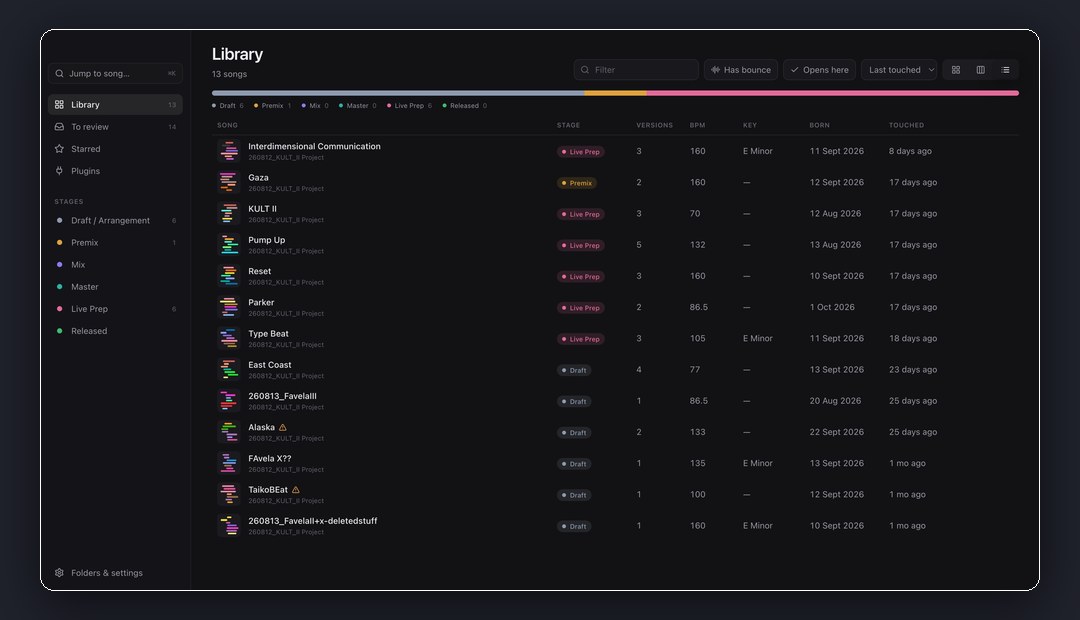
A Mac app that reads every Ableton Live set in your folders without opening Live. Versions, bounces, plugins and notes for every song, in one place.
Seven minutes for a BPM
Some of my Ableton projects took seven minutes to open on my 2013 MacBook Pro (on good days that is). Most of the time I just wanted to know the tempo. By the time the loading bar was done, I'd forgotten the other three things I wanted to check.
Three Macs, one Dropbox full of Save-As forks called "Favela v2?" and "deletedstuff3", and a bounce folder that gets overwritten every time. I used Splice Studio back in the day and loved it. Nothing ever replaced it, so I built my own.
Songs, not files
Session Shelf reads every .als in your folders without opening Live: tempo, key, tracks in their real colors, clips with their MIDI notes, every plugin and sample, and every backup Live ever saved. On top of that it keeps its own model, because file names are unreliable.
- Every card is a song. A cover drawn from the track colors, BPM, stage, last touched. The seven-minute question, answered in a second.
- Same name, different tracks. It doesn't go by names. It compares what's inside the sets (shared samples, identical MIDI clips, tempo) and groups versions into the songs they really belong to. Sure matches are grouped automatically with the reason shown. Unsure ones, it asks you about.
- Every version, one line each. A song page shows the whole history, including Live's own backups. One click opens that exact version in Live. A dice for when you hate naming tracks.
- A/B with fresh ears. Bounces stay linked to their version and the arrangement follows along while they play. Press N and a note is pinned to that second. Double-click the arrangement and it's pinned to that bar.
- Which Mac has my plugins? Every track's devices are listed, anything missing on this Mac is red. Import the plugin lists from your other machines to see where a project will actually open.
- Ready for the stage? My live-set rules, checked straight from the set: at most seven main groups, groups at −6 dB, everything cut into clips.
It only ever reads. Your project files never move.
Under the hood
- The parser runs in a worker thread.
.alsfiles are gzipped XML. A few hundred sets take a couple of minutes on the first scan. After that only changed files are read, and saves in Live show up within seconds. - SQLite for the app's own data. Songs, stages, notes, snapshots and linked bounces live in one library file in Application Support. Nothing is written next to your projects.
- A custom
media://protocol for seeking through bounces, with macOS doing the audio conversion so AIFF and friends just play. - Signed, notarized, self-updating. Universal DMG built with electron-builder, updates served from a small public releases repo.
- The landing page is static HTML with a handful of Vercel functions: beta-key download, double opt-in signup via Buttondown, and a feedback button in the app that opens an issue straight on the repo.
The walkthrough
For years I presented products for Native Instruments on camera, explaining other people's features. This time I got to walk through an app that solves a problem I actually have, and that I now use every day. The slide deck, voice-overs and video assembly were all scripted too, which was its own little rabbit hole.
Try the beta
It's in public beta: free, Mac only, verified with Live 12. The download form on the landing page asks for a beta key. Since you're reading this here, use this one:
welcometothebetaportfoliovisitor
Point it at your messiest folder and tell me what breaks. There's a Feedback button at the bottom left of the app, and it comes straight to me.
Built on a Mac with React and Electron, together with Claude.